Which Business Processes to Automate with AI First: A Ranked List
Seven business processes to automate with AI, ranked for a first project: what AI does in each, what it needs, the risk, and a quick test.


Table of Contents
Below is a ranked list of seven processes. For each one: what AI does, what it needs, what can go wrong, and a simple test that tells you if it is a good first candidate for your company. A decision table puts all seven side by side.
This post answers one question: what to automate first. For the full method (how to map a workflow, run a pilot, and scale), read the pillar guide, AI Workflow Automation for SMBs.
What makes a process a good first candidate?
A first automation has one job: to work, so the team believes the next one will. That means you pick for low risk and fast proof, not for the biggest possible prize. Use four questions:
- Does it repeat every week? Volume gives you enough cases to see if the AI is right, and enough saved time to notice.
- Do the inputs arrive in a predictable form? Invoices, order emails, and forms look alike from case to case. Strategy notes do not.
- Can a person check the output faster than doing the work? If checking takes as long as doing, you saved nothing.
- Is a mistake cheap to catch before it leaves the company? A wrong draft that a person fixes costs a minute. A wrong payment or a wrong email to a client costs much more.
Four yes answers: a strong first candidate. Three: a good second project. Two or fewer: wait. The fourth question matters most. It is the same idea as reversibility in our guide to how much AI agents should do on their own: start where a mistake can be undone.
The ranking below applies these four questions to a typical company of 20 to 200 people. It is our judgement, not survey data. Your order can differ. A recruiter with few invoices and many candidates will rank the list differently from a distributor with hundreds of suppliers.
Which processes should we automate with AI first? The ranked list
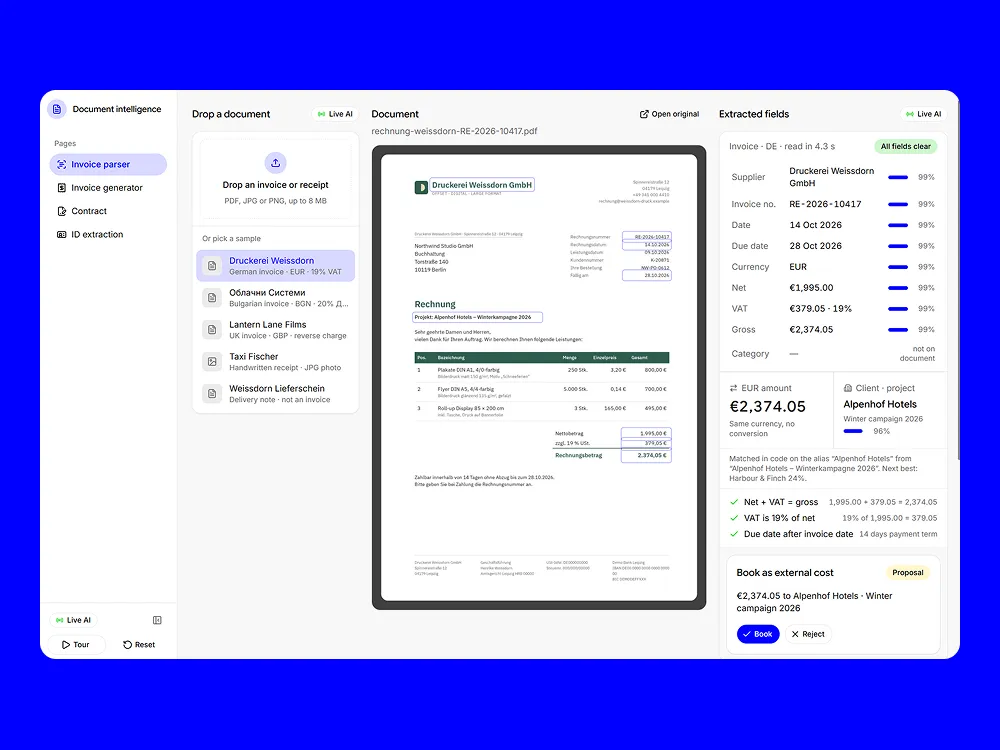
1. Invoice capture and matching (accounts payable)
What AI does: It reads invoices that arrive by email or as PDFs or scans. It extracts the vendor, amounts, and line items, and matches them to the purchase order or delivery note. It flags what does not match and prepares the entry for the accounting system. A person approves before anything is paid.
What it needs: Access to the invoice inbox, an up-to-date vendor list, purchase orders or contracts to match against, and write access to accounting (or an export the accountant imports).
Risk: Low, if a person approves payments. The AI prepares; it does not pay. The main failure is a wrong match that a tired reviewer approves. Keep the approval step real, and send every mismatch to a person.
Good first candidate if: invoices arrive every week, most come from repeat vendors, and someone on your team now types them in by hand.
2. Inbound email and request triage
What AI does: It reads the shared inboxes (info@, orders@, support@), sorts each message by type and urgency, and pulls out the key data (order number, client, deadline). It routes the message to the right person and drafts a first reply for simple cases.
What it needs: Access to the inboxes, a short list of request types and who handles each one, and example replies.
Risk: Low to medium. A wrong label sends a message to the wrong person, who passes it on. The real risk is sending replies automatically too early. Start with drafts that a person sends.
Good first candidate if: one or two people spend part of each day only reading and forwarding email, and most requests fall into a short list of types.
3. CRM updates and sales follow-up
What AI does: It logs calls, meetings, and emails to the CRM. It updates deal stages, drafts follow-up emails after meetings, and lists deals that have gone quiet. In a Salesforce survey of 5,500 sales professionals, reps said they spend 70% of their time on non-selling tasks. CRM admin is part of that time.
What it needs: A CRM that your team really uses, access to email and the calendar, and call notes or transcripts.
Risk: Low for logging, medium for outreach. A wrong CRM note is an annoyance. A wrong or badly timed email to a prospect damages a relationship. Automate the logging first. Keep a person on the send button for anything a client reads.
Good first candidate if: you have three or more salespeople and “nobody updates the CRM” is a common complaint.
4. Answers to internal questions (knowledge retrieval)
What AI does: Staff ask questions in plain language (“What did we agree with this client on payment terms?”, “Where is the latest price list?”). The AI answers from your own documents, chats, and records, and shows where each answer came from. Done well, this is the start of a Company Brain: one place that holds how your company works, which people and AI agents can ask.
What it needs: Access to the places where knowledge lives (drive, wiki, email, chat), and documents that are current. It also needs access rights that match your company’s rules. A junior employee must not get the answer that only a partner should see. Our post on the permission gap explains how to get this right.
Risk: Medium. A confident wrong answer is worse than no answer. Require a source with every answer, so people can check it. The other risk is a leak across access levels.
Good first candidate if: the same questions reach the same two or three people every week, and the answers exist somewhere in writing.
5. Recurring reports and briefs
What AI does: It collects figures and status from your systems and writes the weekly report: hours and margin per client, late orders, open invoices, pipeline changes. A manager reads a page instead of building a spreadsheet.
What it needs: Read access to the systems that hold the figures, and one example of the report you want.
Risk: Low to medium. A report only informs; it does not act. But a wrong figure that nobody checks can drive a wrong decision. Keep a link from each figure back to its source.
Good first candidate if: someone builds the same report by hand every week or month.
6. Customer onboarding
What AI does: It collects documents and data from the new client, checks that nothing is missing, fills in contracts and account setup from one intake, schedules the kickoff, and sends the welcome material.
What it needs: A defined onboarding checklist, templates, and access to every system that onboarding touches (often CRM, contracts, billing, a project tool, and email).
Risk: Medium. It is the client’s first experience with you, and it touches many systems. A missed step is visible to the client. Automate the document chase and the checklist first, and keep the relationship call with a person.
Good first candidate if: you onboard new clients every week, the steps are the same each time, and clients wait on you for paperwork. If you sign two clients a month, it is not a first project.
7. Employee onboarding
What AI does: It triggers account setup and tool access before day one, sends forms, and answers the new hire’s questions (“Where is the leave policy?”, “Who approves my expenses?”) from your own documents.
What it needs: A current onboarding checklist, HR policies in writing, and access to the systems that create accounts.
Risk: Medium. It handles personal data, and a missed access step blocks a new hire’s first week. Answering questions is low risk if each answer shows its source. Keep any decision about a person (pay, contract terms, performance) out of scope. The EU AI Act lists AI used for recruitment, promotion, termination, and performance evaluation as high-risk in Annex III. Our AI governance guide covers what that means for you.
Good first candidate if: you hire every month and new people lose their first days waiting for access and answers. Companies that hire a few people a year should rank this last. For the knowledge side of onboarding, see how to get new hires productive faster.
How do the seven processes compare?
| Process | What AI does | What it needs | Cost of a wrong output | Human check | Good first pick when |
|---|---|---|---|---|---|
| Invoice capture and matching | Extracts, matches, prepares entries | Inbox, vendor list, POs, accounting access | Low (caught at approval) | Approves each payment | Invoices arrive weekly from repeat vendors |
| Email and request triage | Sorts, routes, drafts replies | Inboxes, request types, owners | Low | Sends the drafts | Shared inboxes take hours every day |
| CRM updates and follow-up | Logs activity, drafts emails, flags quiet deals | CRM, email, calendar, call notes | Low (logs) to medium (emails) | Sends client emails | 3+ salespeople, CRM out of date |
| Internal questions | Answers with sources | Current documents, correct access rights | Medium (wrong answer, leak) | Checks the source | Same questions every week |
| Recurring reports | Collects figures, writes the brief | Read access to source systems | Low to medium | Reads before acting | Same report built by hand each week |
| Customer onboarding | Chases documents, sets up accounts | Checklist, templates, several systems | Medium (client sees it) | Owns the client call | New clients every week, same steps |
| Employee onboarding | Provisions access, answers questions | Checklist, written policies, account tools | Medium (personal data) | Owns people decisions | You hire every month |
Read the table for your top two or three candidates. Then run the four-question test on each. The winner is usually the one with the cheapest mistake, not the biggest saving.
Which processes should we not automate first?
Some processes look attractive because they are expensive. They are bad first projects because a mistake is expensive too.
- Anything that moves money without approval. Prepare payments with AI; let a person release them.
- Pricing and quotes sent straight to clients. Draft them with AI, but a person signs off.
- Decisions about people. Hiring, promotion, and performance decisions carry legal duties and real harm when wrong.
- Processes that run a few times a year. Annual budgets and audits do not give you enough cases to check the AI.
- Workflows that cross many fragile systems. If a process touches many tools with no clean way to connect them, the integration work outweighs the gain for a first project.
These can come later. Once one automation runs well, the team knows how to check AI output, and the data behind the first process is clean. Both make the next project easier.
How do we pick between two good candidates?
If two processes pass the four-question test, use these tie-breakers, in this order:
- The one with an owner who wants it. A process owner who is tired of the manual work will test, give feedback, and defend the project. One who is not interested will let it die quietly.
- The one with the cleaner data. Invoice matching with an up-to-date vendor list beats onboarding with checklists that live in three people’s heads. Our guide to AI-ready data shows how to check.
- The one you can measure before and after. Count the hours or the cases today, so you can show the change in a month. The first-90-days ROI guide explains what to track.
If your list of AI ideas goes beyond process automation, use the scoring framework in AI use case prioritization to rank them.
What should we do this week?
Pick the two processes from the list that hurt most. For each one, write down every step as it happens today, who does it, and how often it runs in a week. Then run the four-question test. That one page is enough to choose your first project.
This is also how Superstate starts with every client. We first map how the company really works, and the map ranks the tasks that repeat every day by what they cost. The mapping is free. Then we build agents for the one or two tasks that save the most time. Each agent has one clear job, and what matters goes to a person first.
Frequently asked questions
Which business process should we automate with AI first?
For most small and mid-sized companies, invoice capture and matching is the best first candidate. It repeats every week, the inputs look alike, a person can check each result in seconds, and a mistake is caught before any money moves. If you have few invoices, start with inbound email triage or CRM updates instead.
Which processes should we not automate with AI first?
Avoid processes where a wrong output is expensive or cannot be undone: payments without approval, pricing, legal commitments, and decisions about people such as hiring or promotion. Also avoid processes that touch many fragile systems or run only a few times a year. Automate those later, once the team trusts the first results.
How do we test whether a process is a good candidate for AI automation?
Ask four questions. Does it repeat every week? Do the inputs arrive in a predictable form? Can a person check the output faster than doing the work? Is a mistake cheap to catch before it leaves the company? A process that gets four yes answers is a strong first candidate. Two or fewer means wait.
Do we need clean data before we automate a process with AI?
You need clean data for the one process you automate, not for the whole company. Invoice matching needs an up-to-date list of vendors and purchase orders. Knowledge questions need current documents. Fix the data that the first process reads, and leave the rest for later.

Want to know more about what we do? Visit the Superstate website.