The Company Brain Permission Gap: Access Control That Works
How to keep access rights right in a Company Brain: permission models compared, why the AI model cannot be the guard, and a checklist before go-live.

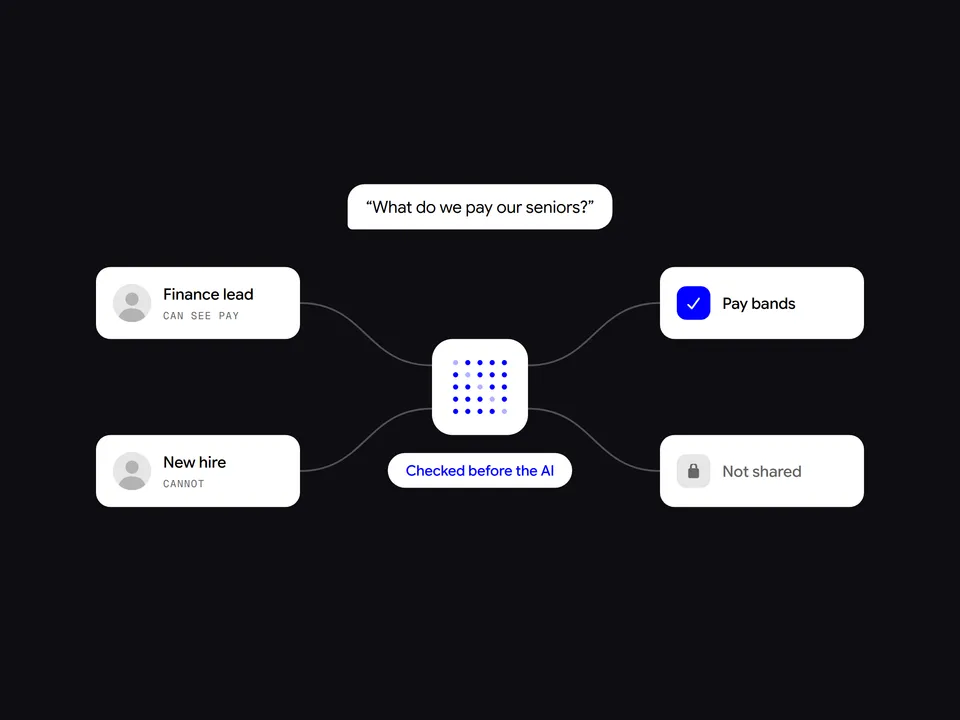
Table of Contents
- Why is access control harder in a Company Brain than in a shared drive?
- Why can’t the AI model decide who may see what?
- How common are AI access control failures?
- Which permission models can a Company Brain use?
- How far should our access control go?
- What are the most common permission failures?
- What rules should a Company Brain follow?
- What should we check before a Company Brain goes live?
- Who should decide who sees what?
- How does Superstate handle access in a Company Brain?
- Frequently asked questions
Most companies spend weeks deciding what goes into their Company Brain. Few spend a day deciding who should see it. That is the permission gap, and it does not fail with an error. It fails when the wrong person asks the right question and gets a complete, confident answer.
A Company Brain is a living record of how a business works that people and AI tools can act on. This post covers why access control is harder in a brain than in a file share, which permission models exist, and a checklist to use before you go live. It is part of our guide on how to build a Company Brain.
Why is access control harder in a Company Brain than in a shared drive?
A shared drive with bad permissions is a quiet risk. The wrong person could open the salary sheet, but they have to know it exists and go looking for it.
A Company Brain removes that friction. That is its whole purpose. Anyone can ask “what do we pay senior developers?” in plain words, and the brain finds the answer in seconds. So every sharing mistake you already have becomes easy to find.
Microsoft says this plainly about its own assistant. Microsoft 365 Copilot “only surfaces organizational data to which individual users have at least view permissions,” and Microsoft tells customers to use the permission models in SharePoint and other services so the right people have the right access (Microsoft Learn). In other words, the AI inherits your sharing. If a folder was open to everyone by mistake, the AI will answer from it for everyone.
A Company Brain adds a second problem a file share does not have: derived knowledge. The brain writes summary pages, client overviews and answers that combine many sources. If one source is restricted and the summary is open, the restriction is gone.
Why can’t the AI model decide who may see what?
It is tempting to give the model all the text and an instruction: “Do not reveal salary data to non-managers.” That does not work reliably.
The OrgAccess benchmark tested how well language models follow role-based access rules. It used 40 types of permissions and cases where a user holds one, three or five permissions at once, some of them in conflict. The authors found that even top models “struggle significantly” to stay within role-based rules, even with explicit instructions. On the hardest cases, GPT-4.1 reached an F1 score of only 0.27 (OrgAccess, arXiv 2505.19165).
The lesson is simple. The model must never see text that the user may not see. Access is filtered in the retrieval layer, by ordinary code, before the model gets any context. The prompt is not a security boundary.
How common are AI access control failures?
Common enough that the first major study of AI breaches made them the headline. IBM’s Cost of a Data Breach Report 2025 found that 13% of organizations reported breaches of AI models or applications. Of those, 97% did not have AI access controls in place. It also found that 63% of breached organizations had no AI governance policy or were still writing one (IBM).
The same report found that one in five organizations had a breach due to shadow AI: tools employees use without approval. A well-run Company Brain with real access control is one of the best answers to shadow AI, because it gives people a safe tool that knows the business. See what shadow AI is and how to handle it.
Which permission models can a Company Brain use?
There are five common ways to decide who sees what. Most real systems combine two or three of them.
| Model | How it works | Good for | Weak spot |
|---|---|---|---|
| Open access | Everyone with a login sees everything | A founding team with no confidential tiers | Breaks the day you hire someone who should not see payroll |
| Role-based (RBAC) | Rights come from a role: finance, sales, HR, management | Most companies of 20–200 people, as the base layer | Roles are coarse; exceptions pile up |
| Inherited from source (document-level ACLs) | Each page or chunk keeps the rights of the file, channel or inbox it came from | Brains fed from Google Drive, SharePoint, Slack, email | Inherits every old sharing mistake |
| Attribute-based (ABAC) | Rules on attributes: client, region, project, seniority | Agencies and firms where access follows the client or the project | Harder to set up and to explain |
| Relationship-based (ReBAC) | Rights follow links: “owner of this deal,” “member of this project team” | Deal pipelines, client accounts, case files | Needs a clean record of who owns what |
A practical default for a small or mid-sized company: roles as the base, rights inherited from sources, and named exceptions for deals, clients and HR files.
How far should our access control go?
Think of it as levels. Each level adds control and work.
| Level | What it controls | Typical company |
|---|---|---|
| 1. Open | All content visible to all users | A small founding team |
| 2. Role-based groups | Department-level separation | HR files hidden from sales; finance scoped to finance |
| 3. Named exceptions | Individual access within a role | A deal owner sees their pipeline, not every pipeline |
| 4. Filtered answers | Same question, different answer by rights | The CEO sees full margins; a sales rep sees the margin on their own deal |
| 5. Audited enforcement | Every access logged; unusual access flagged; reviews on a schedule | Regulated work: legal, finance, healthcare |
Many early Company Brains stop at Level 1, because that is the version that works in a demo. Any company that holds client data, personnel files, legal matters or deal terms should reach Level 3 before go-live, and plan for Level 4.
What are the most common permission failures?
Flat access: everyone sees everything
The brain holds the full breadth of company knowledge and has one access tier. A new hire can ask about board-level budget variances. A contractor can read years of strategy notes. No fact in the brain is wrong to hold. The problem is who the brain tells.
Rights in the directory, not in the answer
The company has roles in its directory, but the brain does not check them when it answers. Or it checks the source file but not the summary page it built from that file. The label exists. The answer ignores it.
Stale access: rights that outlive the job
A contractor finishes. An employee moves from sales to operations, or leaves for a competitor. If their rights are not revoked in every source and in the brain, the brain keeps answering as if nothing changed. In a file share this is routine IT work. In a brain that answers any question in seconds, every query from that account is an exposure.
Agents with a master key
An AI agent gets one service account with access to everything, so it “always works.” Now anyone who can talk to the agent can reach everything the agent can reach. See how much to let AI agents do on their own.
What rules should a Company Brain follow?
Five rules cover most of the risk.
- Filter before the model. Retrieval returns only what the asking person may see. The model never gets the rest.
- Derived pages inherit the strictest source. A summary built from a restricted file is restricted. If that makes a page useless to most people, split it into an open part and a restricted part.
- Agents act on behalf of a person, or with narrow rights for one job. No master keys. What matters, such as a payment or a message to a client, goes to a person first.
- Every answer shows its source. If people can see where an answer came from, they can also spot when it came from somewhere it should not.
- Log access and review it. Who asked what, and what the brain returned. Review on a schedule, and when someone leaves.
Databricks lists governance, PII handling and access controls among the core skills in its context engineering certification. Access is part of the job of building the brain, not an add-on. More on that discipline in what context engineering is.
What should we check before a Company Brain goes live?
Use this checklist. Every line should be a clear “yes.”
Before you load knowledge
- We have a written map of who needs to know what: by role, by client, by project.
- Business leaders signed off on the map, not only IT.
- We listed the sensitive areas: salaries, HR cases, deal terms, legal matters, board material, client data.
- We cleaned up sharing in our source tools: no “anyone with the link,” no company-wide folders that hold private files.
In the system
- Every page keeps the rights of its sources.
- Summary and overview pages take the strictest rights of their sources.
- Access is filtered before the model sees any text.
- Each agent has its own narrow rights, or works with the rights of the person it serves.
- Access is logged.
Tested
- We asked sensitive questions as a junior employee, a contractor and a manager, and got the right answer for each.
- We tried indirect questions too (“summarize what we discussed about pay in Q3”).
- We removed a test user’s rights and confirmed the brain stopped answering them at once.
Run
- Leaving and role changes trigger a rights update in the brain, not only in email.
- Someone reviews the access log on a schedule.
- One named owner decides access questions.
This checklist fits into a wider AI policy. See what AI governance a small business needs.
Who should decide who sees what?
Leaders and operators, not engineers. The people who know what HR must never share with sales, or what a board member sees that a team lead does not, run the business. Engineers then build what they decide.
That is why access belongs in the first mapping work, not at the end. When a team describes how a pricing exception gets decided, it also says who needs to know about it and who does not. It is the same conversation, done completely.
How does Superstate handle access in a Company Brain?
Superstate builds each client’s Company Brain on its own server, and never shares it with other clients. The client decides what goes in and who sees it. Every answer shows the page it came from. What matters goes to a person before anything is sent or paid.
Superstate works under a contract and, where GDPR requires it, a data processing agreement. On request, it states in writing which AI providers it uses for the client’s work and where they process the data. If a client stops working with Superstate, it keeps everything: the brain is written in plain pages its people can open and read.
Frequently asked questions
Can a Company Brain leak sensitive data?
Yes. A Company Brain makes knowledge easy to find, and that includes salaries, deal terms and client files. If access rights are wrong, or if the brain ignores them, the wrong person can ask a plain question and get a full answer. The fix is to filter what each person can reach before the AI writes an answer.
Can we tell the AI model who may see what and let it decide?
No. Research shows that models follow complex permission rules poorly. In the OrgAccess benchmark, GPT-4.1 reached an F1 score of only 0.27 on the hardest permission cases. The model should never see text the user may not see. Enforce access in the retrieval layer, not in the prompt.
What is RBAC and is it enough for a Company Brain?
RBAC is role-based access control: people get rights through their role, such as finance or sales. It is a good base, and most small companies can start with it. Most also need named exceptions, such as a deal owner who sees only their own deals, and rules for pages that combine sources with different rights.
How should AI agents get access to a Company Brain?
An agent should act with the rights of the person it works for, or with a narrow set of rights for its one job. It should never get a master key to everything. What matters, such as a payment or a message to a client, should go to a person for approval first.
What is the first step to get permissions right?
Map who needs to know what before you load any knowledge. Business leaders make this call, not engineers: they know what HR must never share with sales and what a board sees that a team lead does not. Then clean up the sharing in your existing tools, because the brain will inherit it.

Want to know more about what we do? Visit the Superstate website.