The AI Vendor Lock-In Trap SMBs Must Escape
AI vendor lock-in raises switching costs and hands pricing power to the vendor. Learn how SMBs can avoid the trap with five practical strategies.

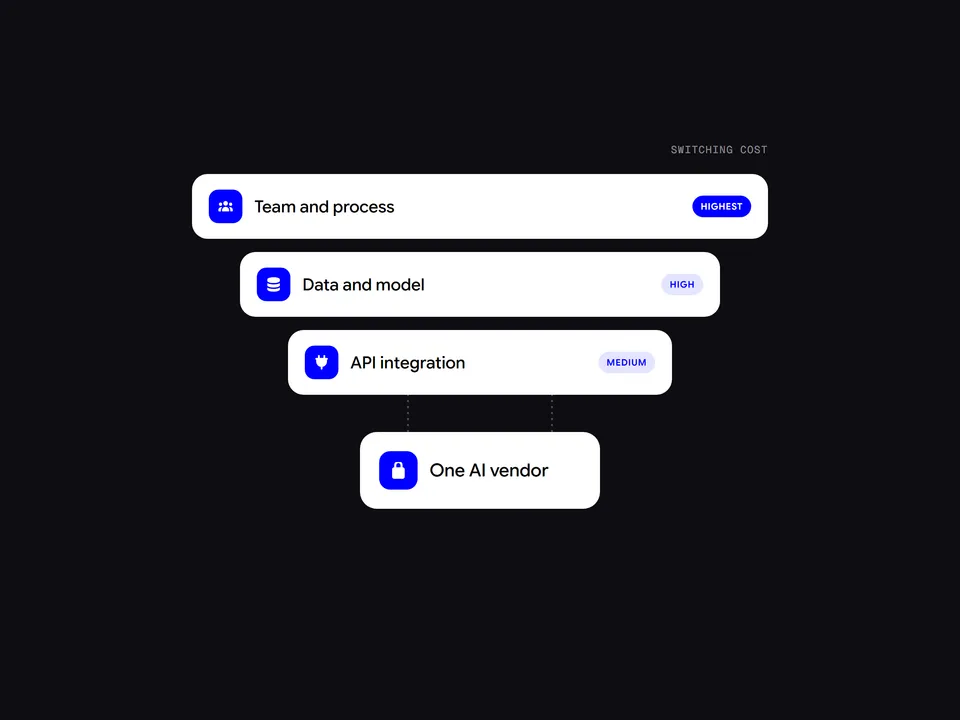
Table of Contents
- What is AI vendor lock-in, and why does it hit harder than SaaS lock-in?
- Why is the pricing risk rising?
- How does lock-in actually happen? The three dependency layers
- What are five strategies to resist lock-in?
- Is renting AI different from owning it?
- Expert perspective
- What should you do on Monday morning?
- Frequently asked questions
The risk is not abstract. On April 15, 2026, Anthropic moved Claude enterprise from fixed pricing to a dynamic usage-based model. The Register reports that experts think this could double or triple costs for heavy users. Most companies built their workflows on the assumption that current pricing would last.
This article explains what AI vendor lock-in looks like, why the risk is rising, and how to build an AI approach that survives the next price change.
What is AI vendor lock-in, and why does it hit harder than SaaS lock-in?
AI vendor lock-in occurs when a business depends on one AI provider’s APIs, data formats, and tooling so much that switching is very costly or technically hard. Ordinary SaaS lock-in, such as being stuck on one CRM, is painful. AI lock-in is structural.
Switching CRMs means migrating data and retraining staff. Switching AI providers means rewriting prompt chains, rebuilding integrations, and checking outputs again across every workflow that touches the model. It can also mean retraining custom models. The same Register article cites a Zapier survey: only 42% of organizations that tried to migrate between AI platforms said it went smoothly, and the other 58% said it failed outright or needed far more effort than expected.
Lock-in grows when a company adopts AI tools reactively, grabbing whatever is cheapest or most popular, and bolts them onto existing processes. The tool works and the workflow runs. Then the vendor changes the rules.
Why is the pricing risk rising?
The five largest U.S. cloud and AI providers (Microsoft, Alphabet, Amazon, Meta, and Oracle) committed to spending between $660 billion and $690 billion on capital expenditure in 2026, nearly double 2025 levels. Spending of this size has to be paid back, and business customers are part of the answer.
We cannot say how future prices will move. We can say that AI pricing is not fixed. A review of SMB AI costs reports that most SMBs spend between $500 and $5,000 a month on off-the-shelf AI solutions. If that line grows with vendor pricing, it becomes one of the most volatile costs in your technology budget.
How does lock-in actually happen? The three dependency layers
Lock-in builds in layers that compound over time.
Layer 1: API integration
Every workflow built on one provider’s API creates a technical dependency. Prompt formats, response parsing, error handling, and rate limits are all provider-specific. A company that runs 15 automated workflows through one provider cannot move to another without changing each one.
Layer 2: Data and model dependency
Fine-tuned models, training data uploaded to a provider’s platform, and usage patterns that shape model behavior create a second lock. The longer you use one provider, the more of your institutional knowledge lives in its ecosystem.
Layer 3: Organizational dependency
Teams learn one set of tools. Processes are designed around specific capabilities. Documentation names specific models. The switching cost stops being technical and becomes organizational: retraining, redesigning workflows, and rebuilding trust in outputs.
| Lock-in layer | What gets trapped | Relative switching cost |
|---|---|---|
| API integration | Prompt chains, parsing logic, error handling | Medium: engineering time |
| Data and model | Fine-tuned models, training data, usage patterns | High: rebuilding |
| Organizational | Team skills, process design, documentation | Highest: culture change |
By the time a company reaches Layer 3, switching feels less like a migration and more like a renovation.
What are five strategies to resist lock-in?
The goal is to get the full benefit of AI providers while keeping the ability to switch, negotiate, or use several providers.
1. Build an abstraction layer
Put a standard interface between your business logic and the AI provider. When the provider changes, you swap one component instead of rewriting everything. This is basic software design, but many companies skip it when they move fast.
2. Keep prompts and configurations portable
Store prompt templates, system instructions, and settings outside the provider’s ecosystem. Version them. Document what each prompt does and why. A prompt that only works on one model is a lock-in vector.
3. Negotiate before you scale
The worst time to negotiate is after 200 employees use the tool every day. Agree pricing, usage tiers, and termination terms before you scale. Treat AI contracts with the rigor of cloud infrastructure contracts.
4. Own your data
Do not upload proprietary data to a provider without reading its retention and usage policies. Keep master copies of datasets, fine-tuning settings, and evaluation sets in your own systems. Your knowledge is the asset. Keep it in a form you own, such as a Company Brain: a sourced, plain-language memory of your business that does not belong to one model vendor.
5. Design for a provider-agnostic workflow
The workflow should say “classify this support ticket by urgency.” It should not say “send this to model X with these parameters.” That difference separates a flexible system from a trapped one.
Is renting AI different from owning it?
Many businesses rent AI through monthly subscriptions and API calls. The SBE Council’s 2026 survey found that 82% of small business employers have invested in AI tools. Adoption and ownership are different things. A rented tool gives you the output but not the model, the infrastructure, or the pricing leverage.
| Approach | Switching risk | What you own | Pricing control |
|---|---|---|---|
| Off-the-shelf AI SaaS | High | Little or nothing | Vendor sets price |
| Custom build on one provider’s API | Medium to high | Your code and prompts | Limited: token pricing can change |
| Provider-agnostic custom build | Low | Code, prompts, and data | Higher: you can use several providers |
The cheapest option today can become the most expensive one later. For a full comparison of costs across buying, building, and partnering, read our build vs buy guide.
Expert perspective
“Every company that adopted AI tools in 2024 and 2025 made a bet - most of them without realizing it,” says Anton Tsenov, CEO of Superstate. “The bet was that the pricing, the API structure, and the capability of their chosen provider would remain stable. That bet is already losing. The companies that will thrive are the ones building AI infrastructure they control, not AI subscriptions they rent. The difference between those two approaches is the difference between a strategic asset and a monthly expense that someone else controls.”
What should you do on Monday morning?
Pull up every AI tool and API your company pays for. For each one, answer three questions. What happens to our workflow if the price doubles? What happens if this provider ends our access with 30 days’ notice? How long would it take to switch?
If any answer makes you uncomfortable, fix that dependency first. Start with the abstraction layer. Then set a rule for new purchases, as described in our guide to AI tool sprawl, and review your policy with the AI governance guide. For the wider automation plan, see the AI workflow automation guide.
Superstate builds a Company Brain and AI agents for each client on a map of how the company really runs. The mapping is free, and you pay only if you accept the offer.
Frequently asked questions
What is AI vendor lock-in?
AI vendor lock-in happens when a business depends so much on one AI provider’s APIs, data formats, and tools that switching becomes costly or hard. Unlike ordinary SaaS lock-in, it also involves prompt chains, integrations, and outputs you must check again after a move.
How can businesses avoid AI vendor lock-in?
Put an abstraction layer between your workflows and the AI provider. Keep prompts and settings portable, and negotiate pricing and exit terms before you scale. Own your training data, and write workflows to say what the AI does, not which AI does it.
Are AI prices going up?
Some are. The Register reports that Anthropic moved Claude enterprise from fixed pricing to a usage-based model on April 15, 2026, and experts think this could double or triple costs for heavy users. Check your own contracts, because each vendor changes terms on its own schedule.
How often do AI platform switches go wrong?
In a Zapier survey reported by The Register, 42% of organizations that tried to move between AI platforms said it went smoothly. The other 58% said it failed outright or took much more effort than expected. Plan for a harder switch than you expect.

Want to know more about what we do? Visit the Superstate website.