AI Build vs Buy for SMBs: When to Build, Buy, or Partner
Should an SMB build, buy, or partner for AI? A decision table, a cost table with sources and stated assumptions, and a short checklist to decide.

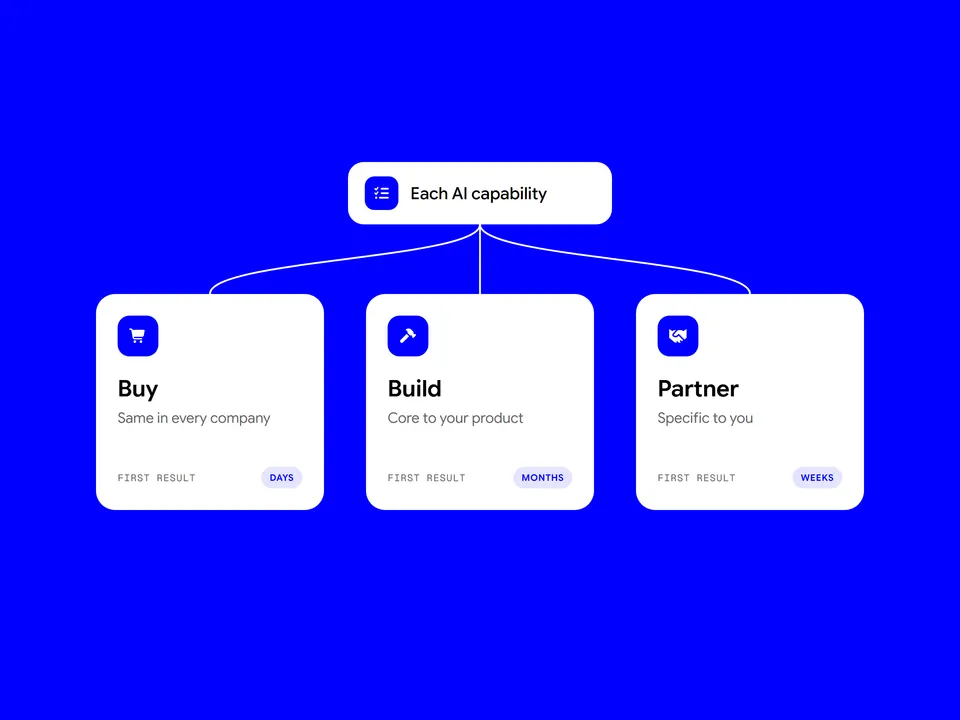
Table of Contents
This post is the one place on this blog for the full comparison. It has a decision table, a cost table with a source or a stated assumption for each number, and a checklist. For the wider question of where your company stands on AI, start with the AI maturity model.
What does “build, buy, or partner” mean?
There are three ways to get an AI capability into your company:
- Buy: rent a ready-made AI product, such as a business AI assistant, an AI help desk, or an invoice reader. You adapt your process to the tool.
- Build in-house: your own staff design, build, and maintain a system shaped around your workflow and data.
- Partner: an outside team builds a custom system for you, connects it to the tools you already pay for, and usually maintains it after launch.
The choice is per capability, not per company. One company can buy its meeting notes tool, partner-build its order intake, and build nothing in-house.
Why do companies get this decision wrong?
Most companies never make the decision on purpose. They buy whatever tool is in front of them, one department at a time. The result is a stack of subscriptions that each solve a small part of a workflow and share no data. Staff still copy numbers between screens. Our post on AI tool sprawl shows how to find and fix that.
The opposite mistake is to build too much. An in-house build looks like control, but it depends on a few people. When one of them leaves or moves to other work, the system stops improving. The research points the same way. MIT’s NANDA research, as reported by Fortune, found that buying AI tools from specialized vendors and building partnerships succeed about 67% of the time, while internal builds succeed only one-third as often.
At the same time, companies are replacing some bought tools with custom ones. In Retool’s 2026 build vs buy report, a survey of 817 Retool customers and builders, 35% of teams had already replaced the functions of at least one SaaS tool, and 78% planned to build more custom tools in 2026. Workflow automations (35%) and internal admin tools (33%) were the categories under the most pressure. Retool sells a tool for building internal software, so read its numbers with that in mind. The direction is still clear: generic tools fit badly where a company’s own workflow is the point.
When does each option fit? The decision table
| Buy | Build in-house | Partner | |
|---|---|---|---|
| Fits when | The task works the same in every company | The system is core to your product and you have AI engineers | The workflow is specific to you, but you have no AI team |
| Typical examples | Transcription, writing help, meeting notes, a general AI assistant | A pricing engine you sell, an AI feature in your own software | Order intake, invoice matching, client reporting, a Company Brain |
| Time to first result | Days | Months, once the team is hired | Weeks for a first workflow |
| Fit to your workflow | Generic; you adapt | Exact, if built well | Exact, built to your map |
| Data | On the vendor’s terms | Yours | Yours, if the contract says so |
| Who maintains it | The vendor, until prices or products change | Your team, for as long as it runs | The partner, with the code and data handed over if you leave |
| Main risk | Tool sprawl and lock-in | Key people leave; the project stalls | A partner who builds and leaves |
| Wrong choice when | The workflow crosses departments or needs your data | You cannot keep at least two people on it | The task is a commodity a cheap tool already does |
What does each option cost? The cost table
Prices for AI change fast, and costs depend on scope. Where a number below has a source, the link is in the table. Where it is an estimate, it is marked as one, with the assumption stated. The example company has 30 staff.
| Cost item | Buy | Build in-house | Partner |
|---|---|---|---|
| Licence or salary | Microsoft 365 Copilot Business: $21 per user per month list price, on an annual plan (a first-year promotion was $18 when checked in Nov 2026). For 30 users: about $7,560 a year at list price | Software developers: median US wage $135,980 a year (BLS, May 2025), before payroll taxes, benefits, and recruiting | Illustrative estimate: a fixed price per workflow, set after a scoping or mapping phase. Ask for a written scope and price before you commit |
| Setup and integration | Illustrative estimate: staff time to set up, connect, and train. Small for a tool used on its own; large if it must connect to several systems | Illustrative estimate: the first build takes months of the team’s time before any result | Included in the partner’s scope, if the offer says so |
| People needed | An owner per tool | Assumption: at least two engineers, so the system survives when one leaves. That means at least twice the median wage above | An owner on your side who knows the workflow |
| Ongoing cost | The licence, every month, plus price rises | Salaries, model and hosting costs, for as long as the system runs | A support or maintenance fee, plus model and hosting costs |
| Cost to leave | Low for a tool used alone; high if your data and workflows live in it | Low, if the code is documented; high, if only one person understands it | Low, if the contract gives you the code, data, and prompts; high, if not |
How to read it: buying has the lowest entry price, and in-house building has the highest fixed cost. Two engineers at the BLS median cost more than $270,000 a year in wages alone, before any software. For most companies of 20 to 200 people, that rules out in-house building for one or two systems. The real choice is usually between buying and partnering, workflow by workflow.
Two hidden costs apply to every path. First, integration: a cheap tool that needs weeks of work to connect is not a cheap tool. Second, lock-in: the harder it is to take your data and logic elsewhere, the more each future price rise costs you. Our guide to AI vendor lock-in shows what to put in the contract.
How do we decide? A short checklist
Run each AI capability through these questions. The answers point to one of the three paths.
- Is it a commodity or a differentiator? If every company does it the same way (transcription, grammar, meeting notes), buy it.
- Would the tool fit us, or would we fit the tool? If a bought tool means bending your workflow to its design, look at partner or build.
- Does it depend on data only we have? Client history, your price rules, how your team decides. If yes, the system must read your data, and you must own that data.
- Does it cross departments? A workflow that moves from sales to operations to finance rarely fits one bought tool.
- What is the full cost over three years? Add licences, setup, integration, people, and the cost to leave. Use the table above.
- Who maintains it in 18 months? If the answer is one person, or “we’ll see”, the system will decay. Name the owner before you start.
- Can we leave? Make sure the contract or the code lets you take your data, prompts, and workflow logic with you.
If questions 1 and 2 point to “buy”, stop there. If questions 2 to 4 point away from buying and you have no AI team, partner. Build in-house only when the system is core to what you sell and you can staff it for years.
What does a good partner do differently?
A good partner starts from your company, not from a product. It maps how work really moves, ranks the workflows by what they cost, and builds for the ones that save the most. Then it stays to maintain the system as models, prices, and your company change. A partner who hands over a plan and leaves gives you the risks of building in-house without the team. Our guide on how to choose an AI transformation partner lists the questions to ask.
Superstate is one such partner. We first map how your company really works; the mapping is free, and you get a written offer with a clear scope and price, and pay only if you say yes. Then we build a Company Brain, one place that knows your clients, documents, rules, and decisions, and the AI agents that work from it. Then we stay, for as long as you want us.
What should we do this week?
Open a spreadsheet and list every AI tool the company pays for, with its monthly cost. Tag each one “commodity” or “differentiator”. Then list the three workflows that cost your team the most manual hours each week.
Compare the two lists. Commodity tasks already served by a cheap tool: keep them. Overlapping tools: cut them. Manual workflows that no bought tool fits, especially ones that read data only you have: those are your build or partner candidates. Run each one through the checklist above. For the method to automate the one you pick, read our guide to AI workflow automation.
Frequently asked questions
Should a small business build or buy AI?
Buy for tasks that work the same in every company, such as transcription, writing help, and meeting notes. Build, or have a partner build, for the workflows that make your company different or that depend on data only you have. Most small and mid-sized companies end up doing both.
Is it cheaper to build or buy AI?
Buying is cheaper to start: a business AI assistant costs a monthly fee per user. Building in-house is the most expensive path, because one software developer alone has a median US wage of about $136,000 a year. A partner build sits between the two. Over time, one custom system can cost less than several subscriptions that do not connect.
What is the success rate of building AI in-house versus buying?
MIT’s NANDA research, as reported by Fortune, found that buying AI tools from specialized vendors and building partnerships succeed about 67% of the time, while internal builds succeed only one-third as often. A likely reason is that internal teams underestimate integration work, data cleanup, and maintenance.
When should an SMB use an AI partner instead of building in-house?
Use a partner when the workflow is worth a custom system but you have no AI engineers, and hiring a team for one or two systems makes no sense. Choose a partner who maps your business first, builds on your data, and stays to maintain the system, so you are not left with code nobody understands.

Want to know more about what we do? Visit the Superstate website.