Company Brain vs Knowledge Management Software with AI
Guru, Notion AI, Atlassian Rovo and Microsoft Copilot add AI to your docs. Is that a Company Brain? What the AI layer adds, and what it still misses.

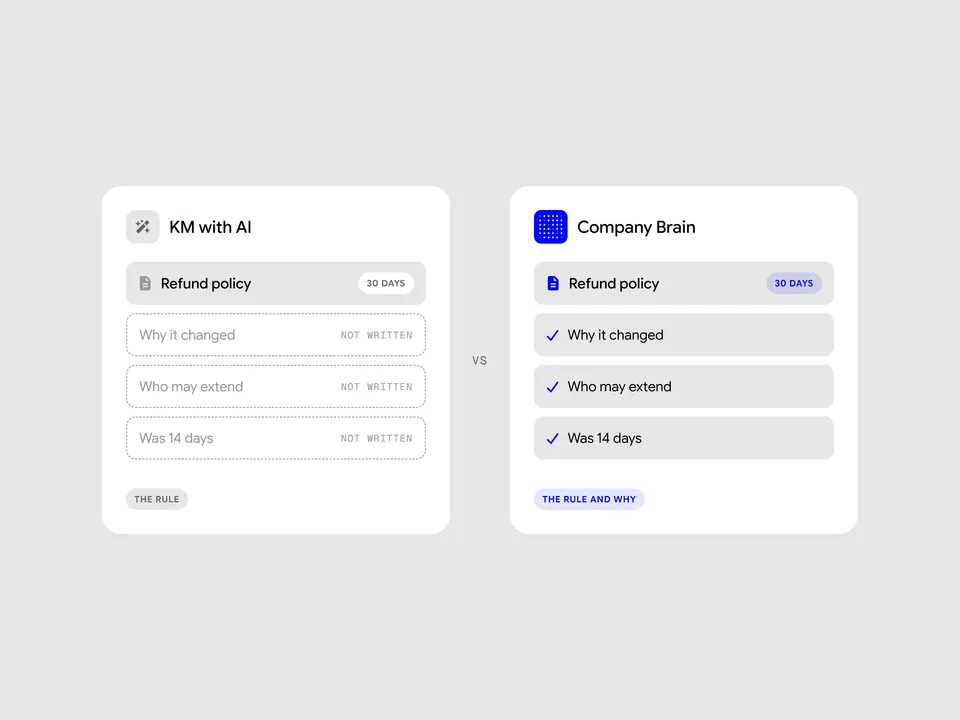
Table of Contents
- What does knowledge management software do?
- What do Guru, Notion AI, Rovo and Copilot actually add?
- What is the “Just Add AI” trap?
- How does KM software with AI compare to a Company Brain?
- What knowledge do these tools miss?
- How do you tell if your AI knowledge tool is enough?
- Should you replace your KM software with a Company Brain?
- Frequently asked questions
Your company already pays for knowledge management. Confluence, Notion, SharePoint or Guru lives in the stack. This year, the vendor added an AI button. Now anyone can ask a question in plain words and get a fluent answer with links.
And when a new hire asks how the enterprise discount policy really works (not the headline rule, but the edge cases and the reason for the last change), the AI gives a confident answer that the sales lead would correct in five seconds.
This article explains why, compares the four most common “KM plus AI” tools with a Company Brain, and gives you a test to run on your own tool. If your question is about static wiki pages in general, read Company Brain vs wiki. This post is about what changes, and what does not, when the KM vendor adds AI.
What does knowledge management software do?
Knowledge management (KM) software, such as Confluence, Notion, SharePoint, Guru and Tettra, stores, organizes and retrieves content that people write. A team writes something down, it goes into the system, and anyone with access can search for it later.
The model is passive at its core. A person creates content, the software holds it, and a second person retrieves it. Until recently, the software did not reason about the content at all. It was an indexed filing system with a search bar.
The AI wave changed the front end. It did not change what goes in.
What do Guru, Notion AI, Rovo and Copilot actually add?
Every major KM vendor now offers an AI layer. The features are real, and some of them are good. Here is what each one says it does, from the vendors’ own pages.
- Atlassian Rovo gives you search, chat and agents across Atlassian and non-Atlassian tools, with connectors such as Google Drive, Gmail, GitHub and Figma.
- Notion AI answers questions across your Notion workspace and connected apps such as Slack, Google Drive and GitHub, with citations.
- Microsoft 365 Copilot grounds its answers in organizational data such as emails, files, meetings and calendars through Microsoft Graph, with access scoped by user permissions.
- Guru pairs AI answers with scheduled verification: each card gets a review date, weekly to yearly, and an assigned expert confirms or updates it.
All four make it faster to find and summarize what exists. Two of them go further than search. Copilot respects the access rights you already set, and Guru puts a person on the hook to keep each card current. Those are real steps toward trustworthy answers.
But look at what all four have in common. Each one reads the content your people already wrote, in the systems you already have. None of them goes out and captures the decision that was made on a call, the exception the account manager handles from memory, or the reason the policy changed last spring.
What is the “Just Add AI” trap?
The trap is buying AI retrieval to fix a capture problem. AI features in KM tools speed up the step that was never the bottleneck. If the operational logic of the business was never recorded, faster retrieval just means faster access to incomplete or contradictory pages.
The trap has three parts.
1. The AI answers with the same confidence whether the source is current or stale. A search results page at least showed you the “last edited” date. A chat answer folds three documents into one fluent paragraph. The reader can no longer see that one source is from 2022 and another contradicts it.
2. The vendor’s own advice is to clean the content first. Microsoft’s Copilot documentation recommends SharePoint Advanced Management to reduce oversharing and clean up inactive sites, because these tasks “declutter Copilot’s data sources and improve the quality of the responses.” In other words, the answer is only as good as the content under it. The AI layer does not fix the content. It exposes it.
3. Verification covers what was written, not what was never written. Guru’s review cycles are a good idea, and they keep existing cards honest. But an expert can only verify a card that someone created. The exception that lives in one person’s head has no card to verify.
The result is a pattern most companies will recognize. The AI pilot demos well, because the demo questions have clean answers in the docs. Then real questions arrive, the ones about exceptions and edge cases, and the answers start to drift from how the business really works. A recent Cloudera and Harvard Business Review Analytic Services survey found that only 7% of enterprises say their data is completely ready for AI. Adding an AI button does not move a company out of the other 93%.
How does KM software with AI compare to a Company Brain?
The difference is not search quality. It is what the system holds and how it stays current.
| Dimension | KM software | KM software with AI (Guru, Notion AI, Rovo, Copilot) | Company Brain |
|---|---|---|---|
| What it holds | Pages people wrote | The same pages, plus connected apps | Decisions, processes, exceptions and their reasons |
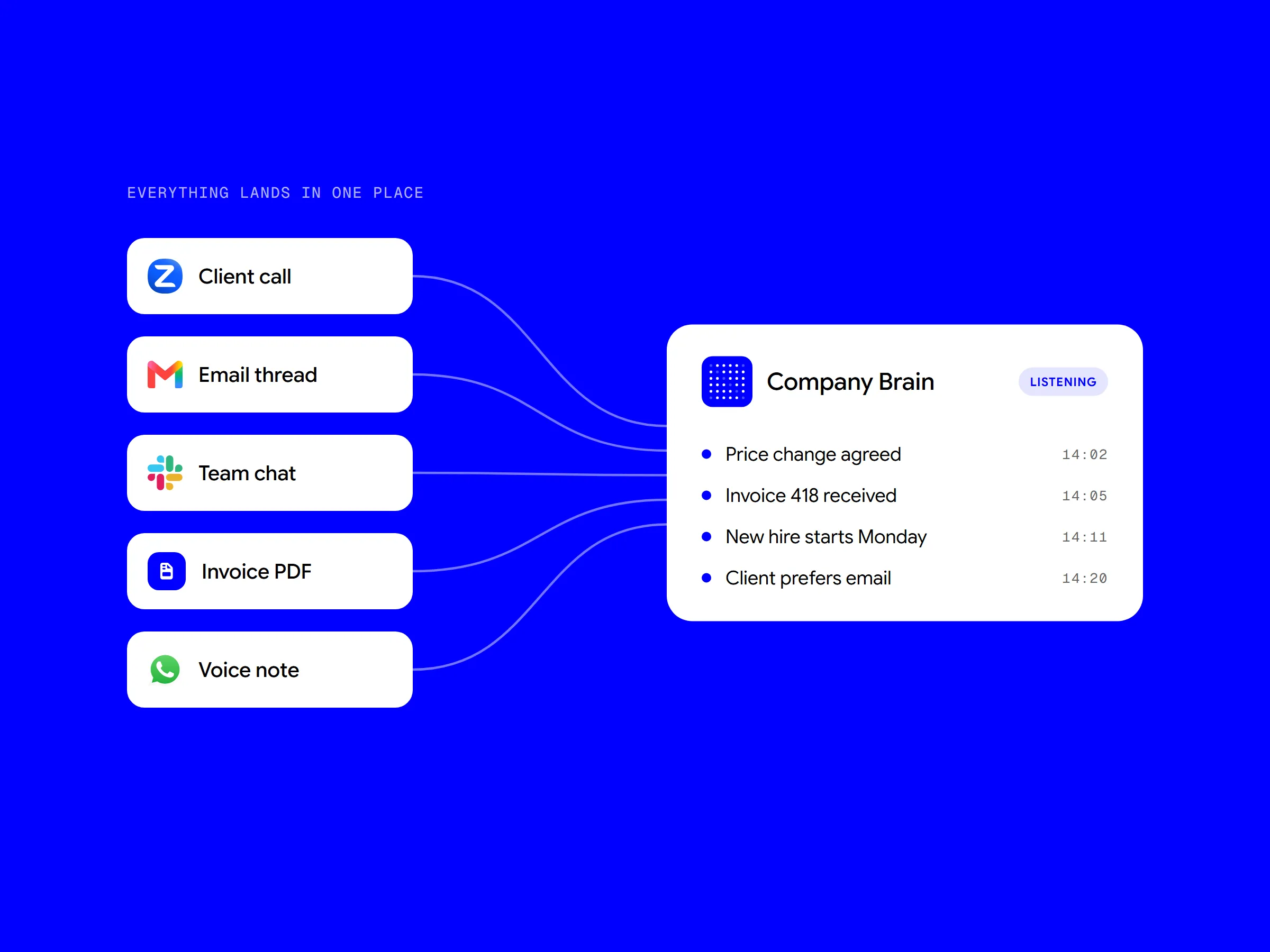
| How knowledge gets in | People write and publish | People write and publish | Captured from what the company already says and writes, as it happens |
| Answer format | A list of documents | A fluent summary with links | A direct answer with the source it came from |
| Contradictions | All versions returned | Often blended into one answer | Shown as a conflict, so a person decides |
| Undocumented knowledge | Missing | Still missing | Captured in the mapping and kept current |
| Staying current | Someone remembers to edit | Someone remembers to edit (Guru adds review reminders) | Updated when the business changes; people correct it and it remembers |
| When an employee quits | Pages stay; context leaves | Pages stay; context leaves | Context was captured before they left |
| What AI agents get | Documents to search | Documents to search, faster | A current model of how the business works |
The middle column is the important one. It looks like progress over the left column, and in the user interface it is. In the rows that decide whether an AI agent can act safely (undocumented knowledge, staying current, what happens when someone leaves), it is the same as the left column.
What knowledge do these tools miss?
KM software reliably captures what a company decided. It almost never captures why, or when the rule does not apply.
For example, picture a support policy page that says the refund window is 30 days. A Company Brain would also hold that the window used to be 14 days, that it changed after a run of complaints from large accounts, that the support director can approve longer windows for the biggest accounts, and that one team lead used to handle those approvals before she left. (This is an illustrative example, not a client case.)
Ask an AI knowledge tool about a refund for a large account that signed under the old terms. It finds the 30-day page and answers “30 days” with full confidence. The answer is sourced from company documentation, and it is wrong for this situation.
Any question that falls outside the documented rule needs the context behind the rule. Without it, every edge case becomes an escalation, an inconsistency, or, when an AI agent handles it, a confident wrong answer. That is the same failure behind context drift in AI agents: the AI acts on knowledge that has fallen out of step with how the business works.
This is also why a KM tool with AI is not the same as enterprise search or a RAG pipeline done well. All three retrieve. None of them creates the missing record.
How do you tell if your AI knowledge tool is enough?
Run this test in an afternoon. It needs one person who knows the business well and your current AI tool.
- Write five questions about real exceptions. Not “what is our refund policy?” but “which clients get longer payment terms, and why?” Pick questions your best people answer from memory.
- Ask your AI tool each question. Save the answers and the sources it cites.
- Check each answer with the person who knows. Mark each one correct, partly correct or wrong.
- For each wrong answer, ask where the right answer lives. If it is on a page the tool missed, you have a search or permissions problem. Your KM vendor can help. If it lives in someone’s head, a call or a chat thread, you have a capture problem. No AI button fixes that.
If most wrong answers trace to “it was never written down,” your tool is doing its job. The job is just smaller than the problem.
Should you replace your KM software with a Company Brain?
Usually not. Confluence, Notion, SharePoint and Guru are good places to write, edit and share documents, and your team knows them. A Company Brain sits at a different layer. It can use those tools as sources, next to email, chat, calls and meetings.
The usual path is layering. Keep the document tools for documents. Add the memory layer for the knowledge that never reached a document, and let your AI tools and agents read from both.
That is how Superstate builds one. It starts with a map of how the company really works: a sixty-minute meeting with leadership, then talks with the people who do the work and a look at the tools already in use. The brain built on that map connects to the tools the team already uses, captures meetings, calls, chats, emails and documents the same day, with the date, and shows the source page for every answer. If two pages disagree, it says so. For the full method, read how to build a Company Brain.
The question is not whether Notion beats Confluence, or whether Copilot is worth the license. The question is whether the system that holds your operational knowledge can answer a real question, or can only find a document faster.
Frequently asked questions
Is a knowledge management tool with AI the same as a Company Brain?
No. Tools such as Guru, Notion AI, Atlassian Rovo and Microsoft 365 Copilot add AI search, chat and agents on top of the content you already have. That makes finding and summarizing faster. A Company Brain adds what the content never held: current decisions, exceptions and the reasons behind them, captured as the business changes.
Why doesn’t AI search fix the problem with our knowledge base?
AI search speeds up retrieval from the pages you already have. If the business logic was never written down, or the page that holds it is out of date, faster search returns the same gap faster. The AI then writes a confident answer from whatever it found, and nothing flags that the answer is wrong.
Should we cancel our knowledge management software if we build a Company Brain?
Usually not. Confluence, Notion, SharePoint and Guru are good places to write, edit and share documents. A Company Brain sits at a different layer and can use those tools as sources. The usual path is to add the memory layer, not to replace the document tools.
How do we test whether our AI knowledge tool is enough?
Ask it five questions about real exceptions, such as which clients get longer payment terms and why. Check each answer against the person who actually knows. If the tool finds the right page and still gets the exception wrong, the missing piece is context, not search. That is the gap a Company Brain closes.

Want to know more about what we do? Visit the Superstate website.